
Complete receiving and close a purchase order
- How-to
- Inbound
- Who can do this: Admin, Warehouse Manager, Floor Supervisor, Warehouse Operative, Account Manager
- Checked on 27 October 2026
Finish a delivery on the Inbound Station so its shortages are logged, and close a Purchase Order when the supplier won't send the rest.
In short
When the lorry is empty, select Complete receiving… on the Inbound Station, check the summary and select Log & complete. If the supplier won't send the backorder, select Close in the Purchase Order's row.
Before you start
Completing a delivery needs an Admin, a Warehouse Manager, a Floor Supervisor or a Warehouse Operative. Closing a Purchase Order needs an Admin, a Warehouse Manager or an Account Manager. If you don't see the button, ask a Warehouse Manager.
Scan everything that came first, and mark any ASN pallet that never came as Not on truck.
Steps
Complete receiving
- Admin, Warehouse Manager, Floor Supervisor or Warehouse Operative only: on the shipment's Inbound Station, select Complete receiving…. The summary lists what will be logged for each line.
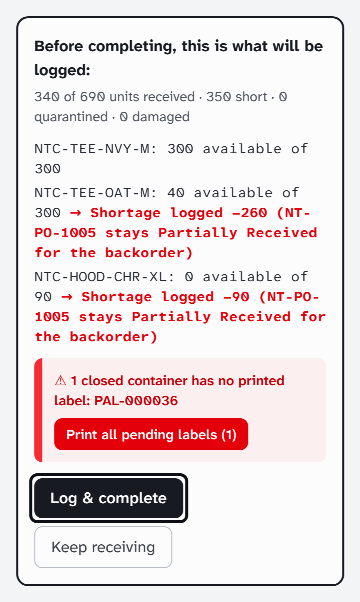
- If it warns that a closed container has no printed label, select Print all pending labels and label them.
- Check the counts. To scan more, select Keep receiving.
- Select Log & complete. Every shortage is logged, and the shipment is Completed.
INB-COL-000023 completed
Shortages logged on 2 lines (350 units); their purchase orders stay open for the backorders.
Close the Purchase Order
- Admin, Warehouse Manager or Account Manager only: go to Inbound › Purchase Orders.
- In the order's row, select Actions, then Close.
- Enter the Closure Reason, such as "Mill cancelled the remaining hoodies.", and select Confirm.
Purchase order NT-PO-1005 closed
What happens next
A completed shipment takes no more scans. Its Purchase Order is Partially Received while a backorder is due, or Received. A closed order is Closed: it expects nothing more, and what was received stands. Book any later delivery against a new order.
Still stuck? Email [email protected]