
Purchase orders and inbound shipments
- Concept
- Inbound
- For: Admin, Warehouse Manager, Account Manager, Warehouse Operative
- Checked on 27 October 2026
How a client's Purchase Order and an Inbound Shipment fit together, from booking in to a completed delivery, and what each status means.
In short
A Purchase Order is what the client ordered from its supplier. An Inbound Shipment is one delivery of it, and every unit received counts against the order's lines.
Two records, two jobs
The office writes the Purchase Order: the client, its supplier, its own number for it and the expected lines. It can take weeks to arrive in full, over several deliveries.
The floor books in the Inbound Shipment when a delivery is on its way. It carries one or more of the client's open Purchase Orders, and their outstanding lines become what the dock expects. It is booked in at one warehouse, which gives it a Transaction Number such as INB-COL-000023. The carrier's own reference goes in its Shipment Reference.
Northern Thread ordered 690 units on NT-PO-1005. The first lorry, INB-COL-000023, brought 340 of them, so the order stays open for the rest.
How a Purchase Order moves on
| Status | What it means |
|---|---|
| Draft | Being written. Lines can still be added. |
| Open | The warehouse expects these goods. The lines are fixed. |
| Partially Received | Some of it has arrived, and the rest is a backorder. |
| Received | Every line has arrived in full. |
| Closed | It expects nothing more. What was received stands. |
| Cancelled | Called off before anything was received. |
How an Inbound Shipment moves on
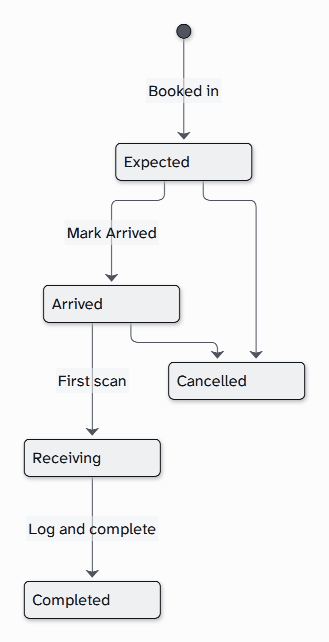
When the shipment arrives, someone marks it at a dock door's Dock Staging location. Stock is received there on the Inbound Station, into pallets and totes or loose. When receiving is completed, any shortage is logged and the shipment takes no more scans.
When the paperwork is different
- With an ASN. The supplier's ASN lists the pallets, lots and serials on the truck. A whole pallet then checks in with one scan of its SSCC.
- With no paperwork. A blind shipment carries no Purchase Order. Every product of the client is counted as it is scanned, and the lines are matched to an order afterwards.
- With a hold. A held client's delivery isn't accepted at the dock, unless an Admin or a Warehouse Manager uses the Dock Override.
Still stuck? Email [email protected]