
Record shortages, over-receipts and damage
- How-to
- Inbound
- Who can do this: Admin, Warehouse Manager, Floor Supervisor, Warehouse Operative
- Checked on 27 October 2026
Log what doesn't match the paperwork at the dock, from a supplier sending too many or the wrong products to stock damaged on arrival.
In short
Extra units, unexpected products, expired lots and serial clashes are logged as you scan, and shortages when you complete. Flag damage straight after its scan, and mark missing ASN pallets Not on truck.
Before you start
You need to be an Admin, a Warehouse Manager, a Floor Supervisor or a Warehouse Operative. If you don't see the Flag last scan panel, ask a Floor Supervisor.
The shipment must be open on the Inbound Station. Have the carrier's Bill of Lading to hand for damage claims.
Steps
What is logged as you scan
Each of these is received and logged under its Discrepancy Reason, with no extra step:
- More than the line expects is an Over-Receipt, received as Available.
Over-Receipt: +3 HB-LAV-BALM-50
- A product of the client the delivery didn't expect is an Unannounced SKU, received as Available.
Unannounced SKU: +1 HB-GIFT-TRIO
- A lot past its expiry date is received as Quarantined.
- A serial not on the ASN, or already received, is a Serial Collision. The unit is received as Quarantined without the serial.
Serial collision: PBL25000901 was already received
KES-PEBBLE received as Quarantined without the serial, and logged. Keep scanning.
Flag damage or a bad lot
- Scan the damaged product, or the container it is in.
- In Flag last scan, enter how many Units are damaged. Leave it blank to flag the whole scan.
- Enter the Carrier BOL and Notes on what you found.
- Select Damaged Freight. The units split off as Damaged, or select Expired Lot or Serial Collision to hold them as Quarantined.
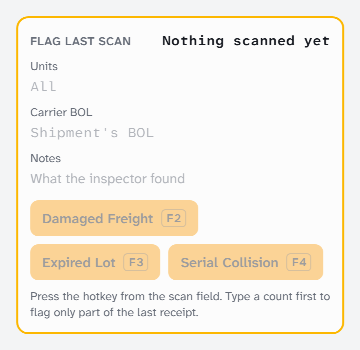
Damaged Freight: 2 × HB-SALT-SCRB-200
2 split off as Damaged; 8 stay Available.
A flagged scan can't be reversed afterwards, so flag after you are sure of the count.
Mark a pallet that never came
- In Pallets on the ASN, find the pallet's SSCC and select Not on truck. Its units are pre-logged short.
- If it turns up after all, select Undo beside it, then scan its SSCC.
Pallet 050601234500000026 marked Not on truck
Its units are pre-logged short; completing the shipment logs them. Undo the mark if it turns up.
Shortages
A line that got less than expected is logged short when you complete receiving. Shortage Logging uses what you scanned, so nothing is entered by hand.
What happens next
Every discrepancy shows in the shipment's Discrepancies section, with its reason, Bill of Lading and notes. Use them for claims. Damaged and Quarantined stock stays held until someone releases it.
Still stuck? Email [email protected]