
Follow your deliveries into the warehouse
- How-to
- Inbound
- Checked on 27 October 2026
Follow your purchase orders and each delivery into your 3PL's warehouse, from expected to received, with anything short or damaged.
In short
Inbound › Purchase Orders shows each order from your suppliers and how much has arrived. Inbound › Inbound Shipments shows each delivery, when it is expected, and what was received, short or damaged.
Before you start
Everyone your company invites can follow deliveries: Client Viewers, Client Users and Client Account Administrators. Your 3PL records your purchase orders and books in each delivery. Tell your account manager when you order from a supplier.
Steps
Your purchase orders
- Go to Inbound. Purchase Orders lists each Purchase Order with its Status, Expected Delivery, Expected Units and Received Units.
- Select a purchase order to see its lines: each product's Expected quantity and Received quantity.
Your deliveries
-
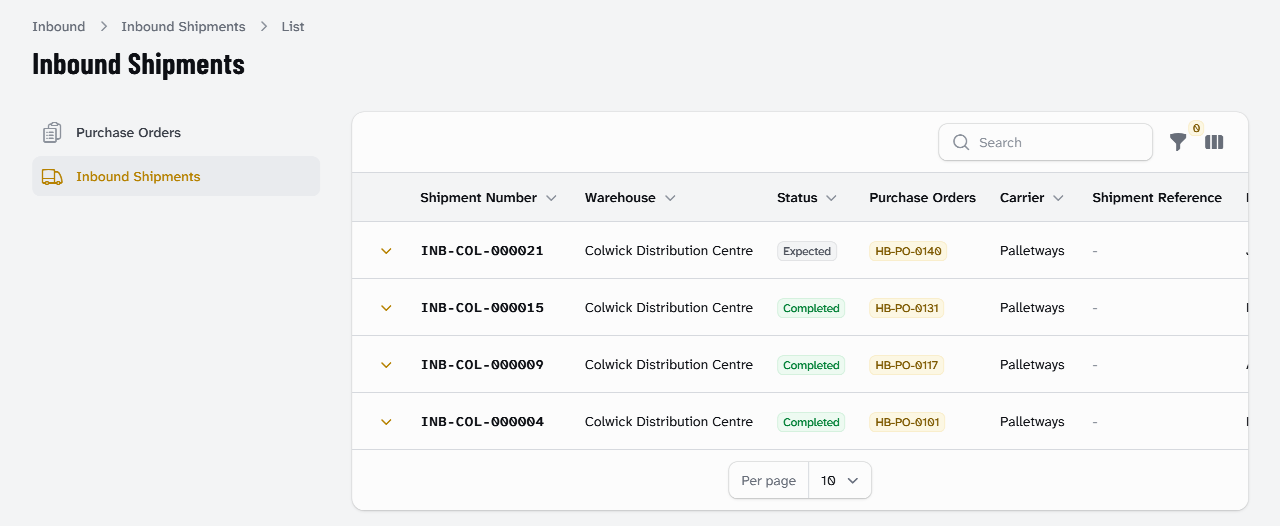
Select Inbound Shipments. Each Inbound Shipment shows its Status, Purchase Orders, Carrier, Expected Arrival and when it Arrived.
-
Select a delivery to see its lines: each product's Expected and Received, and any Over-Received or Short.
-
Under Discrepancies, see anything that didn't match, with its reason and your 3PL's notes.
-
Under Pre-Advised Manifest (ASN), see what your supplier's ASN said was on the truck, if it sent one.
Hebden Botanicals' HB-PO-0140, for 792 units, is expected on INB-COL-000021 with Palletways. On its last delivery, INB-COL-000015, a pallet of oat soap arrived crushed and is listed under Discrepancies as Damaged Freight.
What each status means
| Delivery status | What it means |
|---|---|
| Expected | Booked in, and on its way. |
| Arrived | At your 3PL's goods in, waiting to be received. |
| Receiving | Being counted in. |
| Completed | Received. What arrived is now your stock. |
| Cancelled | Not coming, or booked in by mistake. |
A purchase order is Open while your 3PL expects its goods, and Partially Received once some have arrived. It is Received when every line is in, and Closed when nothing more is expected.
What happens next
Once a delivery is Completed, its stock shows under Inventory. It is Available, or Quarantined if your rules hold every delivery for checks. See See your stock.
If a delivery is late, short or damaged, contact your account manager.
Questions about your stock or deliveries go to your account manager.
Still stuck? Contact your 3PL's account manager.