
Check your account and its status
- How-to
- Clients
- Checked on 27 October 2026
See your account's status and what it means, what your 3PL can do for you now, and your details, rules, dispatch settings and history.
In short
Select Your account. Account status shows your account's status, what it means and since when. The rest of the page holds your details.
Before you start
Everyone your company invites can see this page: Client Viewers, Client Users and Client Account Administrators. Your 3PL keeps your details, status and rules, so ask your account manager to change them.
Steps
-
Select Your account at the top of the screen.
-
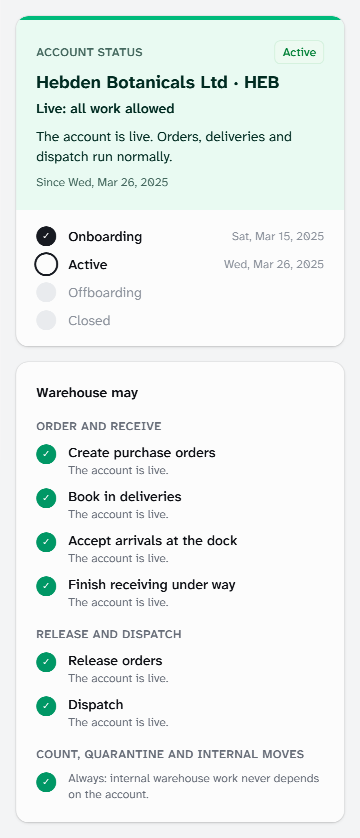
Read Account status: your Client Status, what it means and the date it began. The steps below show which stages your account has reached, and when.
-
Under Warehouse may, check what your 3PL can do for you now, such as Book in deliveries and Dispatch. Each line has a tick or a cross, with the reason.
-
Check General Details, Company Registration Numbers and your addresses. Account Management names your account manager.
-
Below Contacts, read the rules your 3PL follows for your stock and orders. Each says Warehouse standard, Client Override or Client instruction.
-
Under Dispatch settings, check your Dispatch Warehouse, the Sender Name on your parcels and your returns address.
-
Under History, see each change to your account, newest first, with who made it and when.
What each status means
| Status | What it means for you |
|---|---|
| Onboarding | Your 3PL is setting up your account. Nothing is sent out yet, and deliveries are taken only if your 3PL agreed to receive early. |
| Active | Your account is live. Orders, deliveries and dispatch run normally. |
| On Hold | Your 3PL has paused deliveries and dispatch. Orders are still taken in and checked, and wait for the hold to lift. Your stock stays stored. |
| Offboarding | You are leaving. Account status shows the date notice was given and your last trading date, after which deliveries stop. Orders go out until your stock has gone. |
| Closed | The account has ended, and nobody at your company can sign in any more. |
While your account is On Hold, Account status also shows this message:
This account is on hold: no goods are booked in or dispatched until the hold is lifted. Please contact your account manager.
Below it are any Message from the warehouse and Your account manager, with their email address.
What happens next
To change your details, rules or dispatch settings, contact your account manager. A rule change is agreed with you first.
Your Client Account Administrator keeps your contacts and people on this page: see Manage your company's people and contacts.
Questions about your stock or deliveries go to your account manager.
Still stuck? Contact your 3PL's account manager.