
Set up Packaging Items and their costs
- How-to
- Dispatch
- Who can do this: Admin, Warehouse Manager, Finance Manager
- Checked on 28 October 2026
List the boxes, mailers and inner packaging each warehouse packs with, give each its barcode, set what each costs, and take one out of use.
In short
Go to Warehouses › Packaging Items, select Add a Packaging Item and enter its kind, name, barcode, size and weight. A Finance Manager then sets its cost with Costs.
Before you start
You need to be a Warehouse Manager or an Admin to add and change Packaging Items. Costs are set by a Finance Manager; Warehouse Managers can see them but not change them.
Have each item's barcode to hand. It can't be a SKU, a Stock Container barcode or a Location code. Packers scan it from the item or from a packaging sheet at the bench.
Steps
Add a box or mailer
- Go to Warehouses › Packaging Items and select Add a Packaging Item.
- Choose the Warehouse. Each warehouse has its own list.
- For Kind, choose Outer Packaging: a box, mailer or envelope a parcel is packed in.
- Enter the Name, such as
Box, small, and the Barcode, such asPKG-BOX-S. - If it is a client's own packaging, such as its own mailers, choose the client in Client-Supplied Packaging for. Otherwise leave it empty.
- Enter its outer Length (mm), Width (mm) and Height (mm), and its Weight (g). The inner sizes are optional.
- Select Create.
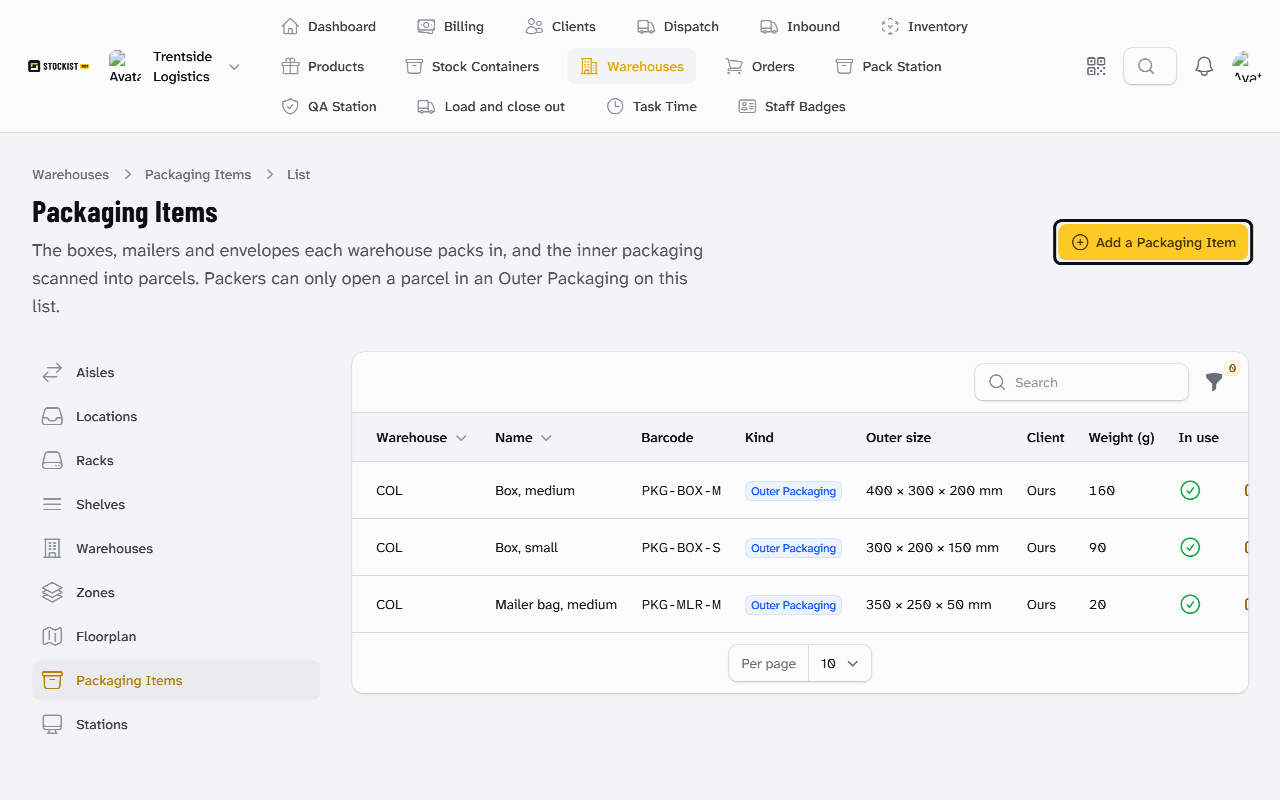
The outer size becomes the parcel's size unless the packer changes it. Its weight is added to every parcel packed in it. See Outer Packaging.
Add inner packaging
- Select Add a Packaging Item and choose the Warehouse.
- For Kind, choose Inner packaging, such as void fill or bubble wrap.
- Enter the Name and Barcode.
- Choose what it is Counted in: Each, Metre or Sheet.
- Enter its Weight per measure (g), and select Create.
Packers scan it with the amount used, and its weight counts towards the parcel. See Inner Packaging.
Set what it costs
-
Finance Manager: in the item's row, select Costs.
-
Enter the Cost (£) of one item, metre or sheet, excluding VAT. Use up to four decimal places.
-
Change From if the cost starts on another day, and add a Note if you like.
-
Select Set cost:
Cost saved
Each cost is in force from its date until the next one. Client-Supplied Packaging costs you nothing, so it has no cost.
Stop using an item
- In the item's row, select Edit.
- Turn off In use and select Save changes.
Packers can no longer scan it at the bench. Turn In use back on to use it again.
What happens next
Packers open parcels only in Outer Packaging on their warehouse's list: see Pack an order at the Pack Station. A client's own packaging is offered only on that client's orders.
Every scan at the bench records the Packaging Item used. That is how packaging costs are worked out per client and order.
Still stuck? Email [email protected]