
Reverse a receipt scanned in error
- How-to
- Inbound
- Who can do this: Admin, Warehouse Manager, Floor Supervisor, Warehouse Operative
- Checked on 27 October 2026
Take back a product scan made by mistake on the Inbound Station, so its stock is voided and the line's count goes back down.
In short
Straight after the wrong scan, select Undo last scan on the Inbound Station, or scan UNDO. The scan's stock is voided and the line's count goes back down.
Before you start
You need to be an Admin, a Warehouse Manager, a Floor Supervisor or a Warehouse Operative. If you don't see Undo last scan, ask a Floor Supervisor.
Undo it before anything else happens to the stock. A Clerical Receipt Reversal takes back only this station's own product scans, while the stock is untouched. Closing its container or flagging it ends that.
Steps
- On the shipment's Inbound Station, select Undo last scan, or scan
UNDO.
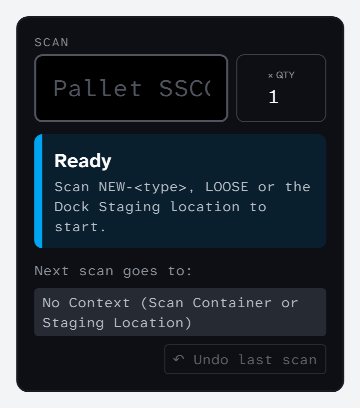
- Read the headline. It names what was taken back and the line's new count.
Reversed: −1 HB-GIFT-TRIO
0 / 0 received · the scan's stock is voided
- To take back the scan before that, undo again. Scans come off newest first.
- Scan the right product, if there is one.
What happens next
The reversed units are Voided and no longer count towards the shipment or its Purchase Order. If the station refuses, the headline reads "Last scan not reversed" with the reason: see Can't undo a scan at the dock.
Still stuck? Email [email protected]