
Raise a Supervisor Call
- How-to
- Dispatch
- Who can do this: Admin, Warehouse Manager, Floor Supervisor, Warehouse Operative
- Checked on 30 October 2026
Call a Floor Supervisor to where you are from the Rapid Scanner and see who is coming, or answer a call from the Pick Board.
In short
On the Rapid Scanner, select Menu › Supervisor Call (while picking, More › Supervisor Call). Stay where you are until the strip under the header says who is coming, and select Done once you've had help.
Before you start
Anyone who picks can raise a call: a Warehouse Operative, a Floor Supervisor, a Warehouse Manager or an Admin. Answering one is for a Floor Supervisor, a Warehouse Manager or an Admin.
Stockist tells your Floor Supervisors where you are from the stop you last scanned on your Pick List. With no list, it uses your Working Location, so scan the location you are at first.
Steps
Call a Floor Supervisor
-
Open the Rapid Scanner. If you aren't picking a list, scan the location you are at, such as
COL-PF-P03B3. -
Select Menu, then Supervisor Call. While you pick, select More, then Supervisor Call. The call goes at once.
-
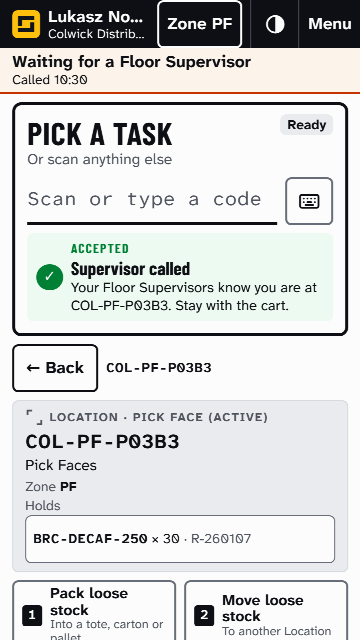
Stay where you are. A strip under the header says Waiting for a Floor Supervisor, with the time you called. You can carry on scanning underneath it.
-
When someone answers, the strip shows who is coming within about 10 seconds, such as Jamie Kerr is coming.
-
Once you've had help, select Done. The strip goes.
If you call before scanning a location, Stockist asks you to scan one first, so your supervisor knows where to find you. If your call is still open, a second one isn't raised: the result says "Already called" and when.
Choosing Can't reach for a short pick raises a Supervisor Call for you, to the stop you are at.
Answer a call
-
Floor Supervisor or above: select Open the Pick Board on the bell's notice, or go to Orders › Pick Board.
-
Under Floor tasks, Supervisor Calls lists who called, where they are and how long they have waited.
-
Select Answer, then Answer again to say you are going. Stockist records who answered and how long the operative waited:
Call answered. Lukasz Nowak waited 2 min.
-
Go to the location. The call leaves the board.
If someone else answered first, Stockist says who:
Already answered. [name] answered it at [time].
What happens next
The bell tells every Floor Supervisor and the warehouse's named Warehouse Managers, such as "Lukasz Nowak needs help at COL-PF-P03B3". A call changes nothing on the Pick List: carry on picking once you've had help.
The scanner stops showing a call left open for more than 12 hours. See Supervisor Call.
Still stuck? Email [email protected]