
An order is refused as a duplicate
- Troubleshooting
- Orders
- For: Admin, Warehouse Manager, Account Manager
- Checked on 28 October 2026
Find out why an order whose Client Order Reference was used before is refused, and how to send it when the reference is used again on purpose.
In short
The client used this Client Order Reference before, on the order named. Stockist refuses it so the same order never ships twice. If it really is a new order, tick This is a new order and send it again.
What you see
What counts as a duplicate
An order is a Duplicate Order when the same client used its Client Order Reference on any earlier order. Every earlier order counts, however it arrived and however long ago, Shipped and Cancelled ones included. Capitals and spaces around the reference don't matter.
Another client's order with the same reference is not a duplicate. A Backorder shares its original's reference and is never a duplicate of it.
A refused duplicate gets no ORD number, and nothing is created.
It is the same order sent again
Check the order the message names. If it is the same order, such as a shop export sent twice, do nothing. The first order goes on as before.
The reference is used again on purpose
Some clients use a reference again on purpose, such as a shop whose numbering went back to 1. Confirm it, and the new order's Order Timeline records who confirmed it, for staff and the client.
-
On the order form: tick This is a new order: the reference is used again on purpose. Then select Send order. The box shows as soon as you enter a reference used before.
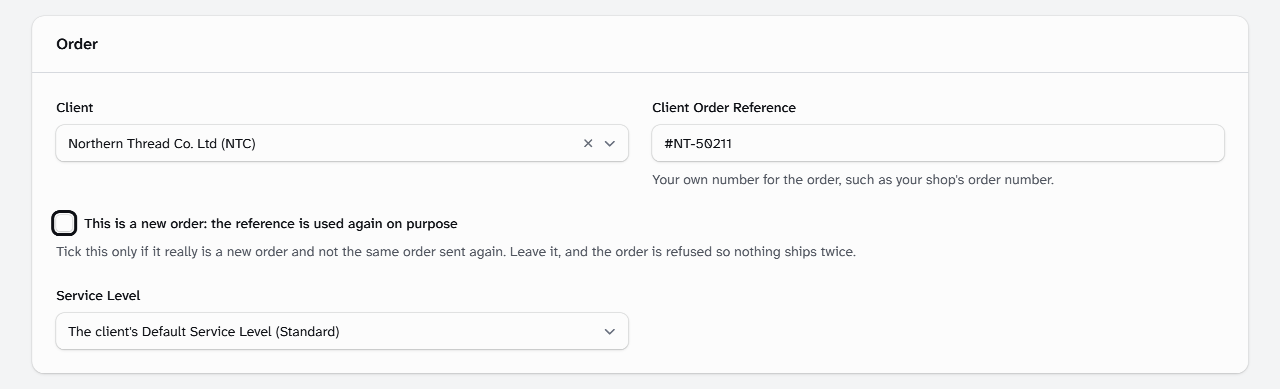
-
In an order upload: tick This is a new order beside the duplicate. Then select Confirm and take in. An upload already confirmed can't be changed, so upload the order again in a new file and tick it there.
-
When you edit an order and change its reference to one used before, tick the same box before you save.
Northern Thread's #NT-50211 shipped as ORD-00000001. An order sent again with #NT-50211 is refused, naming ORD-00000001, which is Shipped.
Still stuck? Email [email protected]