
How an order moves through the warehouse
- Concept
- Orders
- For: Admin, Warehouse Manager, Account Manager, Floor Supervisor, Warehouse Operative
- Checked on 28 October 2026
Know what each Order Status means, how holds stop an order without changing its status, and what can still change at each step.
In short
An Outbound Order is taken in as Received, then moves from status to status until it is Shipped or Cancelled. A held order keeps its status and its stock, and carries on from where it stopped once every hold clears.
Taken in, held or refused
Every order is checked the moment it arrives, whether someone enters it or it comes on an order upload. The check has three outcomes:
- Taken in. The order gets the next
ORDnumber, such asORD-00000016, and starts Received. Numbers run in one series for your whole team. - Taken in and held. A problem a correction can fix, such as an unknown SKU or a missing email, holds the order. It keeps its number and waits at Received.
- Refused. A problem no correction can fix turns the order away with every reason, and it gets no number.
An Order Refusal is for a closed client account, a missing Client Order Reference, or a Duplicate Order. It is also for a delivery outside Great Britain, Northern Ireland and the Isle of Man, or no valid lines. One bad line refuses the whole order, so nothing ships with a line missing.
What each status means
The Order Status says how far the work has got. Staff and clients see the same statuses.
| Status | What it means |
|---|---|
| Received | Taken in and being checked. A held order waits here until it can be accepted. |
| Awaiting Allocation | Accepted, with its Must-Ship-By set, and waiting for stock to be reserved. |
| Partially Allocated | Some of its stock is reserved, and the rest is awaited. |
| Allocated | All its stock is reserved. |
| Released | On a Pick List, with the warehouse floor. |
| Picking | The first unit has been picked. |
| Picked | Every line is picked. |
| In QA | Being checked before packing. |
| Packing | The packer has opened its first parcel. |
| Packed | Packed and waiting for its collection. |
| Shipped | Collected: the carrier collection was closed out. This is final. |
| Cancelled | Cancelled for good, and its stock given back. This is final. |
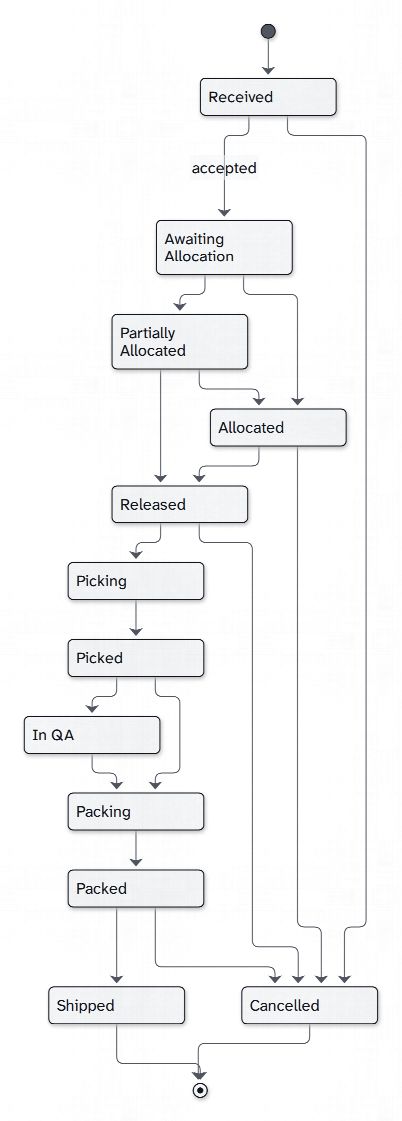
The diagram leaves out some arrows to stay readable. An order can be cancelled from any status before Shipped.
Holds are not a status
An order can carry several holds at once, each with its own plain reason. Examples are Unknown product, Address problem and Held by staff.
While any hold is open, the order can't take its next step. It keeps its status and any stock reserved for it.
Some holds clear on their own once the problem is fixed, such as by adding a missing product. People place and lift others, such as Held by staff.
When the last hold clears, an order still at Received is accepted at once. Its Must-Ship-By counts from then: see How the Must-Ship-By is worked out.
The staff order screen shows each open hold under the order, with how to fix it: see Why an order is held, and how to fix it. Your clients read the same holds in plain words, without your internal notes.
What can change, and when
- Before release (Received to Allocated): the client or your order office can edit or cancel the order outright. Every check runs again on an edit.
- From Released to Packed: nobody changes the lines. A Warehouse Manager can still cancel it, and your client can ask to hold or cancel it.
- Shipped: nothing changes. The order is final.
The Order Timeline
Every order has an Order Timeline: everything that happened to it, newest first under Orders. It records how the order arrived and who sent it, and each hold raised and cleared. It also records each edit, stock reserved and given back, and every step on the floor.
Staff see who did what, with internal notes marked Internal. Clients see the same story in plain words, with your staff shown as "Your warehouse team".
Find an order
- Go to Orders and search by
ORDnumber, Client Order Reference, parcel name or tracking number. - Use the search at the top of any screen, by
ORDnumber or Client Order Reference. - Scan the
ORDnumber on the Rapid Scanner to open its page.
Northern Thread's #NT-50240 came in after the cut-off with the code NTC-TEE-NAVY-M, which matches none of its products. It is ORD-00000005, held as Unknown product at Received until someone corrects the line.
Still stuck? Email [email protected]