
Follow an order and read its timeline
- How-to
- Orders
- Checked on 28 October 2026
Find an order by your own reference, see where it is and when it ships, read its timeline, and change, pause or cancel it.
In short
Go to Orders and select an order by Your reference. Its page shows its status, when it ships by, any holds and its tracking numbers. Its Order Timeline lists everything your 3PL has done with it.
Before you start
Everyone your company invites can follow its orders: Client Viewers, Client Users and Client Account Administrators. Only a Client User or a Client Account Administrator can change, pause or cancel one.
Steps
Find an order
- Go to Orders. Each order shows Your reference, its
ORDnumber, Recipient, Status, Ships by and any Holds. - To find one, enter your reference or its
ORDnumber in Search, such asHB-W-10234. - To see what is due, sort by Ships by. Or select Filter and choose Ships on or after, Ships on or before, a Status, or Held.
- Select the order to open its page.
Read the order's page
-
Read Status, the Order Status, and what it means, such as "Shipped: collected by the carrier."
-
Read Must-Ship-By, the collection the order goes out on, such as "Ships by Tue 13 Jan, 17:30". It shows "Set when the order is accepted" until then. On-time dispatch is measured against the Committed Ship-By under it.
-
If the order is held, read each hold under Holds, and see Why your order is held.
-
Under Lines, see each line's product and quantity, and how much stock is set aside for it. If part of the order went out without the rest, Backorder of and Backordered as link it to its Backorder.
-
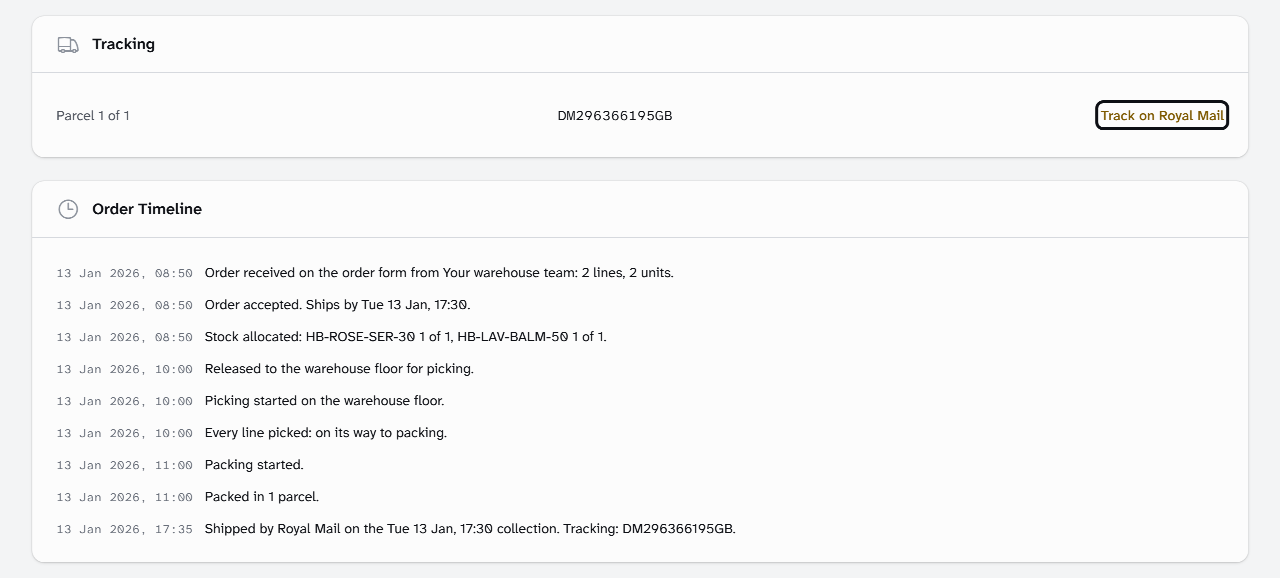
Once it has shipped, Tracking lists each parcel's tracking number. Select Track on Royal Mail to follow it with the carrier.
Read the timeline
The Order Timeline lists each step, oldest first, with its date and time. Your 3PL's people show as "Your warehouse team", never by name.
Hebden Botanicals' HB-W-10234 reads, in part:
Order accepted. Ships by Tue 13 Jan, 17:30.
Released to the warehouse floor for picking.
Packed in 1 parcel.
Shipped by Royal Mail on the Tue 13 Jan, 17:30 collection. Tracking: DM296366195GB.
Change, pause or cancel an order
Until an order is Released, its page has Edit order, Pause order and Cancel order:
- Edit order changes your reference, the Service Level, the delivery details or the lines. Every check runs again when you select Submit, and the ship-by date stays as it was.
- Pause order holds it until you select Resume order. Add a Note for your warehouse team if you like.
- Cancel order cancels it for good, with an optional reason your 3PL reads. Select Cancel the order to confirm.
Once it is on the warehouse floor, ask your 3PL instead:
- Ask to hold stops it at once, until your 3PL lifts the hold. This is a Request to Hold.
- Ask to cancel stops it while your 3PL decides, as a Cancellation Request. It reads your reason, and you read its answer on the timeline.
A Shipped order can't be changed or cancelled. For a problem with a delivered parcel, contact your account manager. They log it as a Delivery Complaint on the timeline.
What each status means
| Status | What it means |
|---|---|
| Received | Your 3PL has the order and is checking it. A held order waits here. |
| Awaiting Allocation | Checked, and waiting for stock to be set aside. |
| Partially Allocated | Some stock is set aside, and the rest is awaited. |
| Allocated | All its stock is set aside. |
| Released | With the warehouse floor for picking. |
| Picking | Being picked. |
| Picked | Every line is picked. |
| In QA | Being checked before packing. |
| Packing | Being packed. |
| Packed | Packed, and waiting for its collection. |
| Shipped | Collected by the carrier. |
| Cancelled | Cancelled for good. |
What happens next
To download the tracking numbers of every order shipped on some days, see Download shipped orders and tracking.
Questions about your stock or deliveries go to your account manager.
Still stuck? Contact your 3PL's account manager.