
Move a container
- How-to
- Stock Containers
- Who can do this: Admin, Warehouse Manager, Floor Supervisor, Warehouse Operative
- Checked on 30 October 2026
Move a pallet, tote or cage and everything packed in it to another location in one step, on the Rapid Scanner or at a desk.
In short
On the Rapid Scanner, scan the container, select Move, then scan the location it goes to. Everything in the container moves with it.
Before you start
You need to be a Warehouse Operative, a Floor Supervisor, a Warehouse Manager or an Admin. If you don't see Move on the scanner or Relocate at a desk, ask a Warehouse Manager.
The container must be active. An inactive container stays where it is until someone reactivates it: see Deactivate or reactivate a container.
Steps
On the Rapid Scanner
-
Open the Rapid Scanner from the top bar (F2 at a desk). Scan the container's barcode, such as
PAL-000036. Its card shows where it is and what it holds.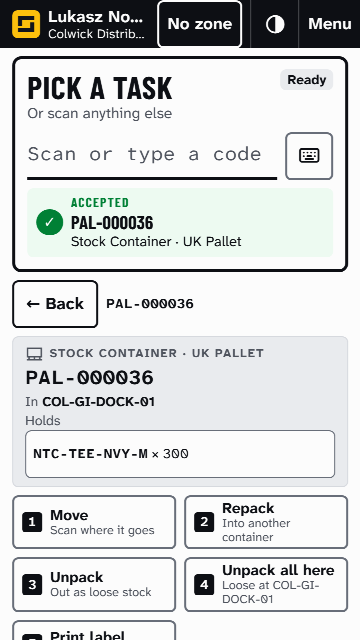
-
Select Move, or use the 1 key. The instruction changes to Scan where it goes.
-
Scan the location, such as
COL-PR-A-05-A-2. The result line says "Moved PAL-000036" and where to, and the location becomes your Working Location.
If you moved the wrong container, select Undo beside the result before your next scan. To back out before scanning a location, select Cancel.
At a desk
- Go to Stock Containers › Containers, select the arrow beside the container, then Relocate.
- Choose the Location. Only locations that can take stock are offered.
- Select Move Container.
If Stockist refuses the move
Stockist checks the location can take the container and everything in it: its size, weight, hazardous goods and Mixing Policy. If not, nothing moves and the scanner's result line, or the message at a desk, says why. Stock or a container won't go into this location explains each reason and what to do.
At a desk, Floor Supervisors, Warehouse Managers and Admins also see Override the weight limit. Turn it on only to go over the location's weight limit on purpose: it lifts no other check. The scanner has no override.
What happens next
Everything packed in the container is now at its new location. The Rapid Scanner and Inventory › Inventory Items show it there at once.
Still stuck? Email [email protected]