
Stock Containers, Container Types and loose stock
- Concept
- Stock Containers
- For: Admin, Warehouse Manager, Warehouse Operative
- Checked on 27 October 2026
Know how Stockist tracks pallets and totes as Stock Containers, what a Container Type sets, and how stock in a container differs from loose stock.
In short
A Stock Container is a pallet, tote or roll cage with its own barcode. It moves with everything packed in it. Stock is either packed in a container or loose in a location, never both.
Containers and their types
Each container belongs to a Container Type, such as UK Pallet or Euro Pallet. The type sets what every container of that kind shares:
- its outer size in millimetres, its tare weight and its maximum payload in grams;
- whether it is hazard compliant, so it can hold hazardous goods;
- its Mixing Policy, which decides whether one container can hold several products or several clients' stock;
- its Barcode Rule: a Barcode Prefix such as
PAL, then a number, as inPAL-000037.
Each prefix has its own Barcode Sequence, so a barcode is never handed out twice. A type marked as a Pick Container gives pickers totes to pick into.
Containers are your own kit and stay in the building. What you dispatch is a parcel packed at the pack station.
Stock in a container, and loose stock
Stock in a container is Containerized Inventory. It has no location of its own: it is wherever its container is. Stock standing in a location on its own is Loose Inventory.
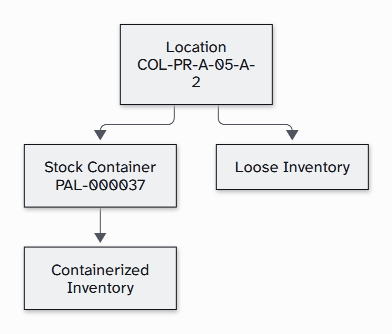
A container sits in one location, or in none until it is first moved. Containers never go inside other containers.
Packing puts loose stock into a container. Unpacking takes it out and leaves it loose in a location. Container Relocation moves a container and everything in it in one step, so nobody moves each product by hand.
Open, closed and inactive
A container's Container Status says whether it is in service, and whether it can take more stock.
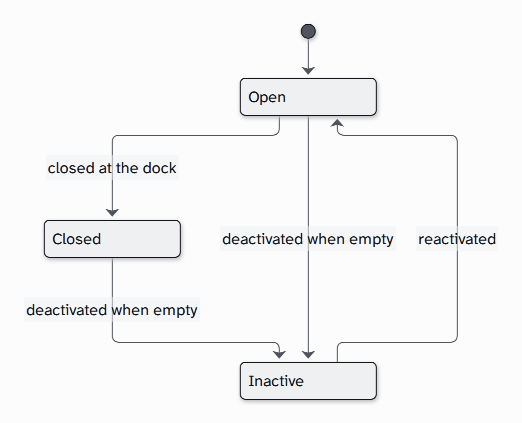
A container filled at the dock is closed there, which records its weights for its Container Label. A closed container takes no more stock, but you can still move it and unpack it.
Who does what
- An Admin or a Warehouse Manager sets up Container Types.
- Warehouse Operatives, Floor Supervisors, Warehouse Managers and Admins bring containers into service, print labels, pack, unpack, move and deactivate them.
- An Account Manager can see containers and Container Types, but not change them.
Still stuck? Email [email protected]