
Put a client on hold, and lift the hold
- How-to
- Clients
- Who can do this: Admin, Account Manager, Finance Manager
- Checked on 27 October 2026
Stop deliveries and dispatch for a client while you sort out a problem such as unpaid invoices, and lift the hold when it's fixed.
In short
On the client's Client 360, select Place hold, enter a Hold Reason and select Submit. Deliveries and dispatch stop until you select Lift hold and give a reason.
Before you start
You need to be an Account Manager, a Finance Manager or an Admin. If you don't see Place hold, ask the client's Account Manager or your Finance Manager.
Only an Active or Offboarding client can be put On Hold. To stop deliveries for a client still in Onboarding, withdraw early receipt instead: see Allow early receipt.
Steps
Place a hold
- Go to Clients and select the client.
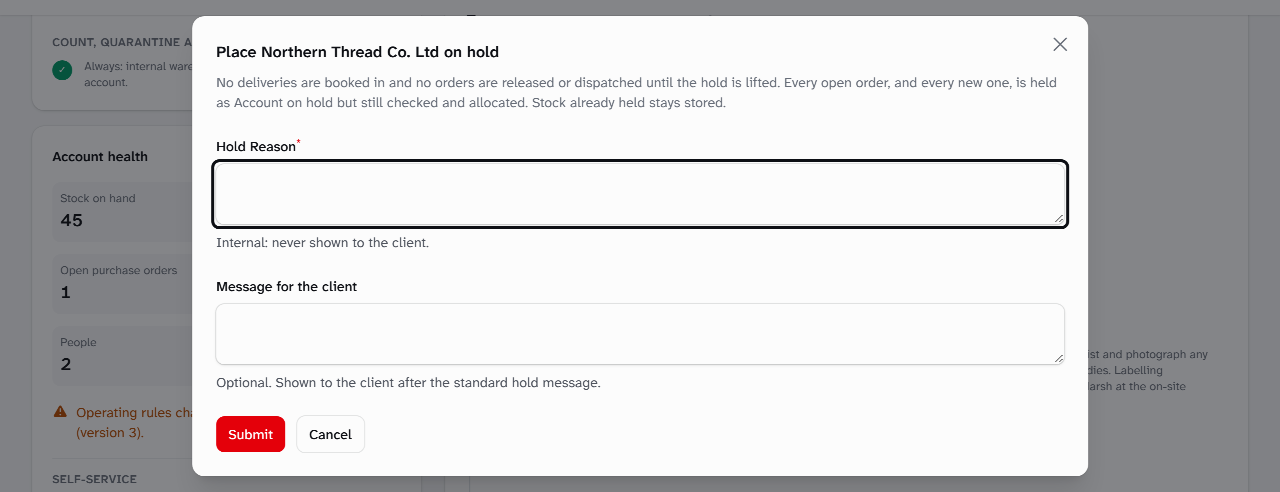
- Under Lifecycle actions, select Place hold.
- Enter the Hold Reason, such as "Three invoices over 45 days, unpaid." Only Account Managers, Finance Managers, Warehouse Managers and Admins see it.
- Optionally, enter a Message for the client, such as who to call. The client sees it after the standard hold message.
- Select Submit. Stockist shows "The account is on hold", and the status changes to On Hold.
Lift the hold
- Go to Clients and select the client. The panel on the left says which status lifting returns it to.
- Select Lift hold.
- Enter a Reason, such as "Paid in full on 14 January.", and select Submit. Stockist shows "Hold lifted".
What happens next
While the hold stands:
- no purchase orders can be created and no deliveries booked in or accepted at the dock, unless a Warehouse Manager or an Admin lets one in with a Dock Override;
- a delivery already being received is finished;
- orders still come in and are checked, accepted and allocated, then wait as Account on hold, and nothing is released or dispatched;
- stored stock stays put, and counts, quarantine and moves carry on.
Floor staff see that the client is On Hold and the message for the client, but never the Hold Reason. The client's people read:
This account is on hold: no goods are booked in or dispatched until the hold is lifted. Please contact your account manager.
When you lift the hold, the client goes back to Active, or to Offboarding if that's where it was. Held orders clear on their own and go on. Both the hold and the lift are in the client's history, with their reasons marked as internal notes.
Peak Fuel Nutrition went on hold over unpaid invoices. Its whey delivery, already on the road, was let in under a Dock Override and is still in quarantine.
Still stuck? Email [email protected]