
A client account's life, from Onboarding to Closed
- Concept
- Clients
- For: Admin, Account Manager, Finance Manager, Warehouse Manager, Warehouse Operative
- Checked on 27 October 2026
Know the five Client Statuses, what your warehouse may do for a client in each, and who moves an account from one to the next.
In short
Every Client Account has one Client Status: Onboarding, Active, On Hold, Offboarding or Closed. The status decides what your warehouse may do for that client, and Stockist refuses any work it doesn't allow.
The five statuses
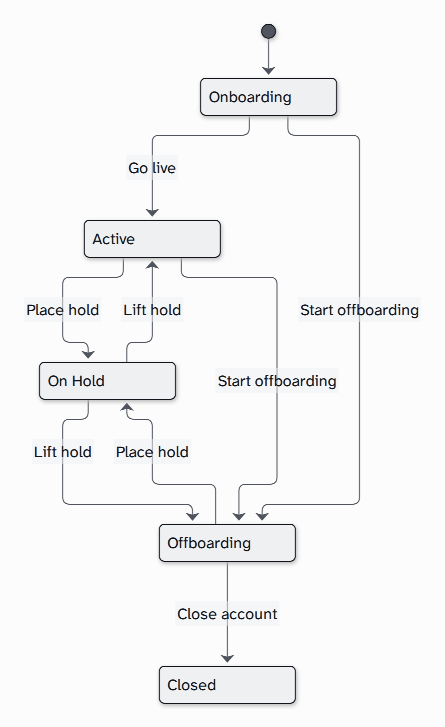
- Onboarding: every new client starts here, with a go-live checklist. Nothing is dispatched, and deliveries are refused unless you allow early receipt.
- Active: live. Orders, deliveries and dispatch run normally.
- On Hold: paused by your team, usually over unpaid invoices. No deliveries come in and no orders go out, but stored stock stays put.
- Offboarding: the client is leaving. Deliveries stop after its last trading date, while orders carry on until its stock has gone.
- Closed: final. Nothing more is done for the client, and its history stays readable for good.
A hold goes back to where it came from. Lifting a hold placed during offboarding returns the account to Offboarding, never to Active. Starting offboarding while a client is On Hold keeps the hold.
What the warehouse may do in each
The Warehouse may list on each Client 360 shows this for one client, with the reason for each answer.
| Work | Onboarding | Active | On Hold | Offboarding | Closed |
|---|---|---|---|---|---|
| Create purchase orders | Yes | Yes | No | Until the last trading date | No |
| Book in deliveries | With early receipt | Yes | No | Until the last trading date | No |
| Accept arrivals at the dock | With early receipt | Yes | Only with a Dock Override | Until the last trading date | No |
| Finish receiving under way | Yes | Yes | Yes | Yes | No |
| Release orders and dispatch | No | Yes | No | Yes | No |
| Count, quarantine and move stock | Always | Always | Always | Always | Always |
Orders still come in for a client On Hold. They are checked, accepted and allocated, then wait as Account on hold until the hold is lifted. Work already released is still picked and packed, but nothing is dispatched.
A Dock Override lets a Warehouse Manager or an Admin accept one delivery for a held client, with a reason. Peak Fuel's whey was already on the road when Finance put the account on hold, so it was let in under a Dock Override.
What a refused operative sees
When Stockist refuses work for a client, it says why in plain words and who to ask, never the Hold Reason:
Peak Fuel Nutrition Ltd is on hold, so no deliveries can be booked in for it. Ask the account manager, Priya Desai.
The client's Account Manager, or an Admin, decides whether to lift the hold, allow early receipt or let one delivery in.
Who moves an account
| Change | Who can do it |
|---|---|
| Add a client, go live, early receipt | Account Manager, Admin |
| Place and lift a hold | Account Manager, Finance Manager, Admin |
| Start offboarding, close the account | Account Manager, Admin |
| Read the Hold Reason | Account Manager, Finance Manager, Warehouse Manager, Admin |
Floor staff see that a client is On Hold, and the message for the client, but never the Hold Reason.
Accounts are never deleted
A Client Account stays in Stockist for good, so its stock movements, orders and charges keep their history. A Closed account stays under Clients, on the Closed tab, and can't be reopened. Oakfield Candle Co. closed after its owner retired, and its history is still there.
Still stuck? Email [email protected]