
How a warehouse is laid out in Stockist
- Concept
- Warehouses
- For: Admin, Warehouse Manager, Warehouse Operative
- Checked on 27 October 2026
How warehouses, zones, aisles, racks, shelves and locations fit together, and what each level adds to a location's code.
The six levels
Each level sits inside the one above it. The Trentside demo's Colwick Distribution Centre shows each one.
| Level | What it is | At Colwick |
|---|---|---|
| Warehouse | The building, with its own Warehouse Code | Colwick Distribution Centre, code COL |
| Zone | A part of the warehouse for one kind of work | Goods In GI, Pallet Racking PR, Pick Faces PF and 3 more |
| Aisle | A passageway through a zone | Aisles A to D in Pallet Racking |
| Rack | A storage structure along an aisle | Racks 01 to 08 along each aisle |
| Shelf | One level of a rack | Shelves A to D on each rack |
| Location | One place stock is put, stored and picked from | 2 locations on each shelf, such as A-01-B-2 |
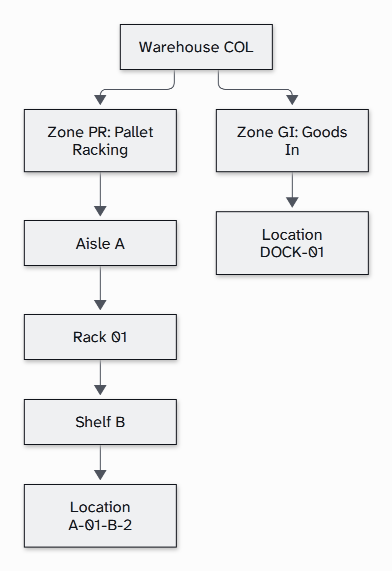
Not every location needs every level. A dock door or a quarantine location has no racking, so it sits straight in its zone. At Colwick, dock doors DOCK-01 to DOCK-04 sit in Goods In, and quarantine locations QA-01 to QA-06 in Quarantine & Returns.
How the codes build up
- The Warehouse Code, such as
COL, is unique in your team. It also starts every delivery number, such asINB-COL-000023, so it is fixed once one has been given. - A zone code, such as
PR, is unique in its warehouse. - A location's own Code, its Location Code, is unique only in its zone. It is what the barcode on its label holds.
- The Full Location Code puts the warehouse and zone codes in front, such as
COL-PR-A-01-B-2. No two locations in your team share one.
Location codes, Full Location Codes and code styles lists every code and code style.
What each location knows
Each location carries the facts Stockist checks before stock goes into it:
- its Location Type, such as Pallet Rack, Pick Face (Active) or Quarantine, which can turn off picking, putaway or reserving stock for orders
- its Mixing Policy, which says whether it can hold more than one product or client
- whether it is Hazard Compliant, for hazardous goods
- its width, height, depth and maximum weight, its Volumetric Capacity
- its Lifecycle State, its Location Status: Active, Maintenance or Inactive
- its Pick Sequence, the order pickers walk it in
How the layout is used
Pickers walk a warehouse's zones in its Zone Walk Order, and each zone in Pick Sequence. Labels print from the locations you make, and the Warehouse Floorplan draws the zones, aisles and racks from where you place them on its grid.
At Colwick, Helen Brooks, the Warehouse Manager, made the pallet racking in one batch. It had 4 aisles of 8 racks, each with 4 shelves of 2 locations. That made 256 locations, each with its code, label and Pick Sequence.
Still stuck? Email [email protected]