
Work the Held Order Queue
- How-to
- Orders
- Who can do this: Admin, Warehouse Manager, Account Manager, Floor Supervisor
- Checked on 28 October 2026
Fix the held orders waiting on you under Orders, the ones that could still go today first, without leaving the screen.
In short
Go to Orders. My holds lists the held orders waiting on you, with the ones that could still go today first. Fix each hold under the order, then select Next in my queue.
Before you start
Every member of staff can open Orders, but My holds fills only for the people who fix holds:
- Account Managers get Unknown product, Address problem and Missing details on the clients they manage.
- Warehouse Managers named on a warehouse get Not enough stock and Cancellation requested there.
- Floor Supervisors get Red Tags.
All holds shows everyone's share. Anyone whose role allows a fix can make it, whoever's queue it is in. A fix your role can't make says who can make it.
Some holds never join the queue: Account on hold, Account not live, Held by staff and Held by client. They show on the Held tab.
Steps
-
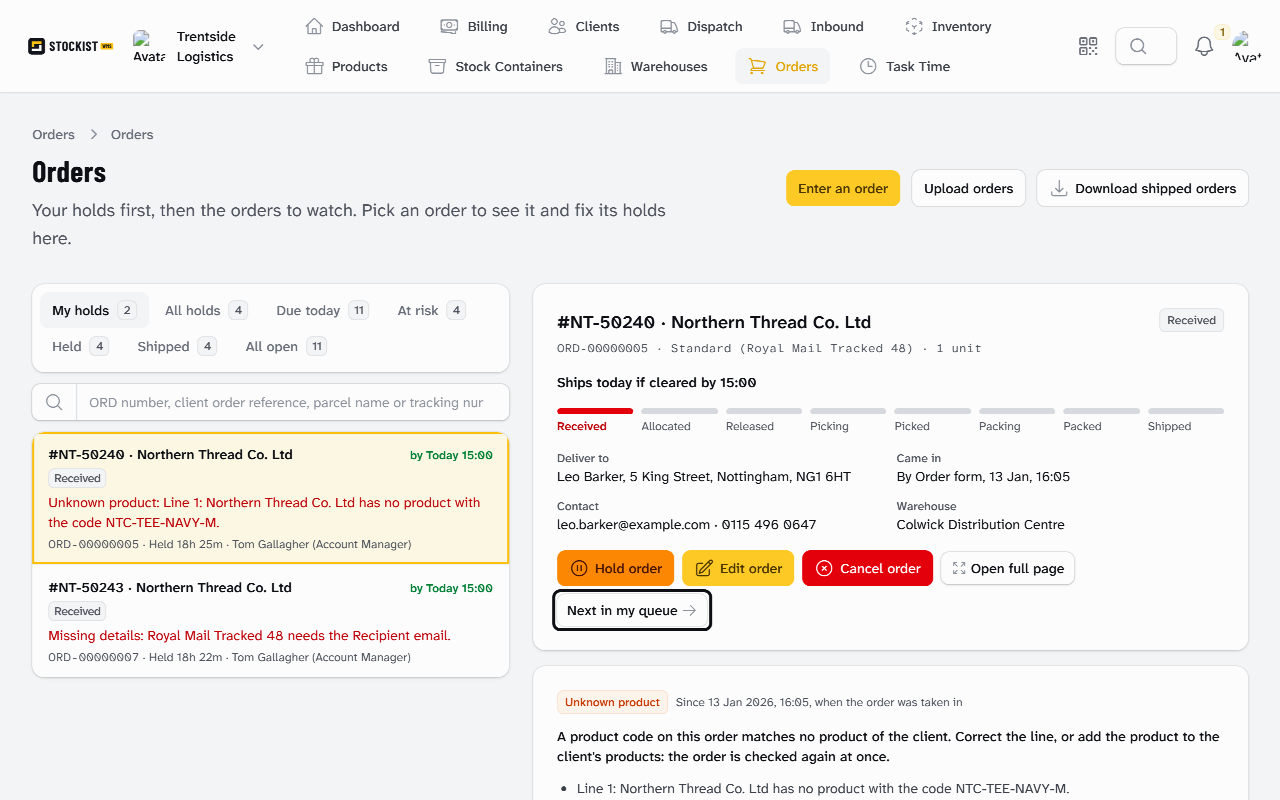
Go to Orders. The worklist opens on My holds, with the first order on the right.
-
Read the row: "by Today 15:00" means the order still ships today if you fix it by 15:00. A row with no "Today" names the collection it can still make.
-
Under the order, read each hold: its reason, what caused it and when.
-
Fix it in place. For an Unknown product, choose the product and select Correct the line. For Missing details, enter what is missing and select Save the details. Each hold's fix is in Why an order is held, and how to fix it.
-
When the order's last hold clears, Stockist says:
This order is no longer in your queue.
-
Select Next in my queue to open the next order waiting on you.
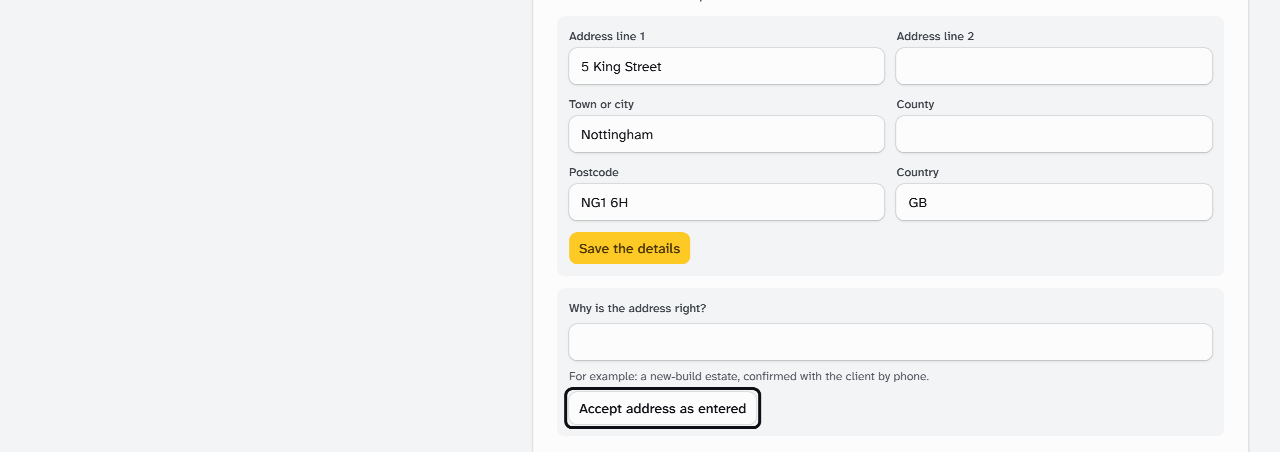
For an Address problem, correct the postcode and select Save the details. For a genuinely new address, enter Why is the address right? and select Accept address as entered instead.
The other tabs
| Tab | What it lists |
|---|---|
| Due today | Open orders whose Must-Ship-By is today or has passed, and held orders that can still make today's cut-off |
| At risk | Orders due today, not yet Packed, that are held, red tagged, short of stock, overdue, or under 90 minutes from their collection |
| Held | Every open order with a hold, including the ones that never join the queue |
| Shipped and All open | What their names say |
Long lists show the first 100. To find any order, enter its ORD number, Client Order Reference, parcel name or tracking number in Find an order.
What happens next
A fixed order is accepted, if it hadn't been, and its Must-Ship-By counts from that moment. Stock is reserved for it, and it moves on like any other order.
Each fix goes on the Order Timeline. Northern Thread's #NT-50240 was held for the unknown code NTC-TEE-NAVY-M. At 10:30 Tom Gallagher saved the code as a SKU Alias. The order was accepted and ships by 17:30 that day.
To see the whole order, select Open full page.
Still stuck? Email [email protected]