
How the Must-Ship-By is worked out
- Concept
- Orders
- For: Admin, Warehouse Manager, Account Manager, Floor Supervisor
- Checked on 28 October 2026
Know which collection an order must ship on, how the client's cut-off, Ship-By Rule, calendar and collections set it, and what can move it.
In short
Every accepted order has a Must-Ship-By: the collection it must go out on, such as "Ships by Wed 14 Jan, 17:30". Stockist sets it when the order is accepted, from the client's cut-off and Ship-By Rule, counting only the days its carrier service collects.
Four steps
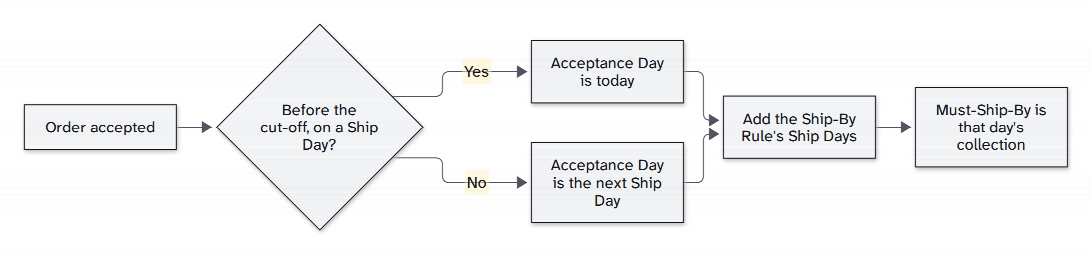
When an order passes its checks, Stockist works its Must-Ship-By out in four steps. It uses the warehouse's own clock, UK time, the same in GMT and BST:
- The cut-off is the earlier of the client's Same-Day Dispatch Cut-Off and the Latest Same-Day Acceptance of the order's carrier service that day.
- The Acceptance Day is today if today is a Ship Day and the order was accepted before the cut-off. Otherwise it is the next Ship Day.
- How many Ship Days later comes from the client's Ship-By Rule, 0 to 5. A Service Level's Ship-By Limit can make it fewer, never more.
- The Must-Ship-By is that Ship Day's collection of the order's carrier service.
An order accepted at the cut-off itself counts from the next Ship Day. One accepted after its cut-off may still go that day if the floor gets to it.
At Colwick
Colwick works Monday to Friday. Royal Mail collects at 17:30 and accepts orders until 15:00. With the starting cut-off of 14:00 and a Ship-By Rule of 0:
| Accepted | Must-Ship-By |
|---|---|
| Wed 14 Jan, 10:00 | Wed 14 Jan, 17:30 |
| Wed 14 Jan, 14:30 | Thu 15 Jan, 17:30 |
| Fri 16 Jan, 15:00 | Mon 19 Jan, 17:30 |
| Sat 17 Jan, 09:00 | Mon 19 Jan, 17:30 |
| Thu 22 Jan, 15:00, before the stocktake closes Fri 23 Jan | Mon 26 Jan, 17:30 |
Hebden Botanicals' cut-off is 13:00, a Client Override. Northern Thread's is 15:00, rising to 16:00 on 1 February. Its cut-off still stays 15:00, because Royal Mail accepts orders only until then.
Kestrel Audio's orders go by Next Day, whose Ship-By Limit of 0 holds them to the same day even if the client's rule allowed more.
Ship Days and collections
A Ship Day is a day the Warehouse Calendar works and the order's carrier service collects, from its Collection Timetable. A day the warehouse works without a collection is not a Ship Day for that service. Special Delivery has its own 12:30 van at Colwick, so its orders have their own Ship Days and cut-off.
On a day with two collections of the same service, the Must-Ship-By is the last one. See Set up the Warehouse Calendar and Collection Timetable.
Held orders
An order held when it comes in has no Must-Ship-By yet: it shows "Set when the order is accepted". Its clock starts only when its last hold clears, so the time a fix takes never counts against it.
Meanwhile it shows what it can still make: "Ships today if cleared by 13:00", or "If fixed now: ships by" a later collection. The Held Order Queue puts the orders that could still go today first.
The Committed Ship-By
The Committed Ship-By is the Must-Ship-By as the rules give it. On-time dispatch is measured against it, and the order page shows it whenever the two differ.
What moves it
Once set, the Must-Ship-By moves only when:
- a delay the client caused ends. A Client Delay is the client's own pause, or a data hold they fixed. When the last one on an order clears, both dates are worked out again from that moment. They never move earlier, and a rushed order is rushed again.
- a Warehouse Manager rushes it or changes it, with a reason: see Rush an order or change its Must-Ship-By. The Committed Ship-By stays where it was.
- it moves to another of your warehouses before release. It ships the same day by that warehouse's collection, or on its next collection there.
Nothing else moves it. Red tags, short picks, cancellation requests and holds your team places for its own reasons leave it alone. So do edits, a new Service Level and changes to the calendar, timetable or rules.
A calendar or timetable change can leave orders on a collection that no longer runs. They are listed as Orders off the timetable, for a Warehouse Manager to move.
Rules frozen at acceptance
The order keeps the client's Effective Operating Rules as they were when it was accepted: its Stock Rotation Policy, cut-off and Ship-By Rule. The full order page lists them under Rules frozen at acceptance and release, each with where it came from and its version.
A Backorder keeps the Must-Ship-By and Committed Ship-By of the order it was split from.
Still stuck? Email [email protected]