
Take a location out of use and bring it back
- How-to
- Warehouses
- Who can do this: Admin, Warehouse Manager, Warehouse Operative
- Checked on 27 October 2026
Flag a damaged location for maintenance so no stock is put away or reserved there, and restore it to Active once it is fixed.
In short
On Warehouses › Locations, select Actions, then Flag Maintenance, in the location's row, and give the reason. On the floor, scan it on the Rapid Scanner and select Flag for maintenance. Once it is fixed, select Restore Active at a desk.
Before you start
You need to be an Admin, a Warehouse Manager or a Warehouse Operative. If you don't see Flag Maintenance, ask an Admin.
Have the location's code to hand, such as D-08-D-2, and a reason your team will understand, such as which upright is damaged.
Steps
Flag a location for maintenance
-
Go to Warehouses › Locations and search for the location by its code.
-
In its row, select Actions, then Flag Maintenance.
-
Enter the Maintenance Reason, such as
Upright clipped by reach truck, waiting for inspection.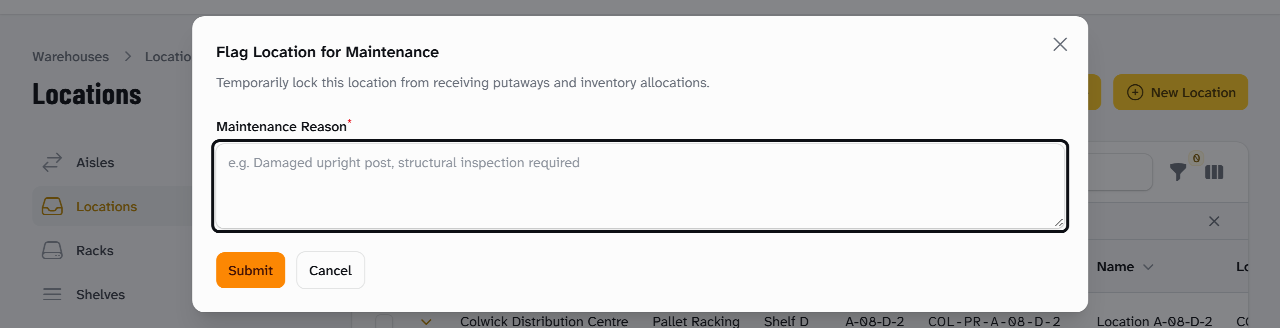
-
Select Submit. Stockist shows Location flagged for maintenance, and the location's Location Status is Maintenance.
Flag it from the Rapid Scanner
- On the Rapid Scanner, scan the location, such as
COL-PF-P03B3. - Select Flag for maintenance. Stockist asks what needs fixing there.
- Enter the Maintenance Reason and select OK. The result says "Flagged for maintenance", and nothing is put away into it until it is back in service.
A location already in Maintenance shows In maintenance on that tile instead.
Bring it back into use
- Go to Warehouses › Locations and search for the location.
- In its row, select Actions, then Restore Active.
- Select Confirm. Stockist shows Location restored to active state, and the reason is cleared.
What happens next
While a location is in Maintenance, nobody can put stock away there. Stockist refuses it with the reason:
Location '[location]' is currently under MAINTENANCE ([reason]) and cannot accept putaway.
Orders don't reserve stock in it, so pickers aren't sent there. Any stock already in it stays on the books, so move it out with the Rapid Scanner if the location isn't safe.
The Warehouse Floorplan marks each rack with a location in Maintenance, so the whole team can see it. To find them all, filter Warehouses › Locations by Lifecycle State.
Still stuck? Email [email protected]