
Log a Delivery Complaint
- How-to
- Orders
- Who can do this: Admin, Warehouse Manager, Account Manager
- Checked on 28 October 2026
Record what a client says went wrong with a shipped order, with the parcel and who caused it, so your team and your billing can act on it.
In short
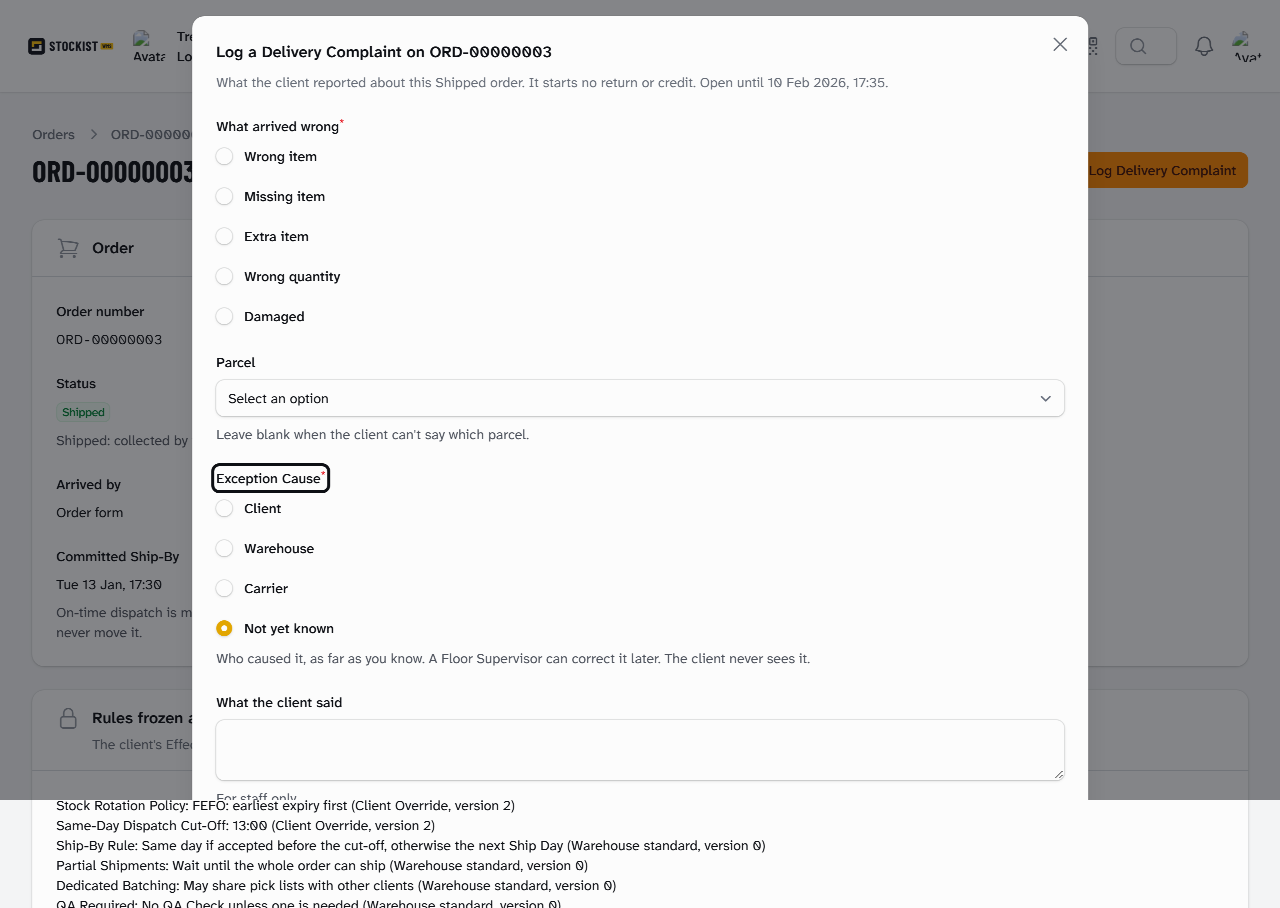
Open the Shipped order's full page and select Log Delivery Complaint. Choose what arrived wrong, the parcel and the Exception Cause, enter what the client said, and select Submit.
Before you start
You need to be an Account Manager, a Warehouse Manager or an Admin. If you don't see Log Delivery Complaint, ask the client's Account Manager.
The order must be Shipped, and you have 28 days from the moment it shipped. Logging a complaint starts no return, refund or replacement: arrange those with the client yourself.
Have the order's ORD number or Client Order Reference to hand, with what the client told you.
Steps
-
Go to Orders. In Find an order, enter the order's
ORDnumber or Client Order Reference, then select the order. -
Select Open full page.
-
Select Log Delivery Complaint. The form says when the order's 28 days end, such as "Open until 10 Feb 2026, 17:35".
-
Under What arrived wrong, choose Wrong item, Missing item, Extra item, Wrong quantity or Damaged.
-
Under Parcel, choose the parcel, such as
ORD-00000003-1. Leave it blank when the client can't say which. -
Under Exception Cause, choose who caused it as far as you know: Client, Warehouse, Carrier or Not yet known.
-
Under What the client said, enter their words. Only your staff see them.
-
Select Submit. Stockist confirms:
Delivery Complaint logged on ORD-00000003
Hebden Botanicals reported that its order HB-W-10234 arrived with the lavender balm tin dented. Priya Desai logged it on ORD-00000003 as Damaged, parcel ORD-00000003-1, caused by the Carrier.
What happens next
The Order Timeline shows "Priya Desai logged a Delivery Complaint about ORD-00000003-1: it arrived damaged." Your note shows under it, marked Internal. The client reads "Delivery complaint logged about ORD-00000003-1: it arrived damaged." and never sees the cause or your note.
The complaint's Exception Cause is listed on Billing › Exception Causes. A Floor Supervisor can correct it there with a reason: see Correct an Exception Cause.
You can log more than one complaint on an order while its 28 days last. After that, Log Delivery Complaint no longer shows. See Delivery Complaint.
Still stuck? Email [email protected]